Call States and Lifecycle

View as Markdown

Every call in Telcoflow progresses through a defined set of states. Understanding these states is critical for building correct call flows.
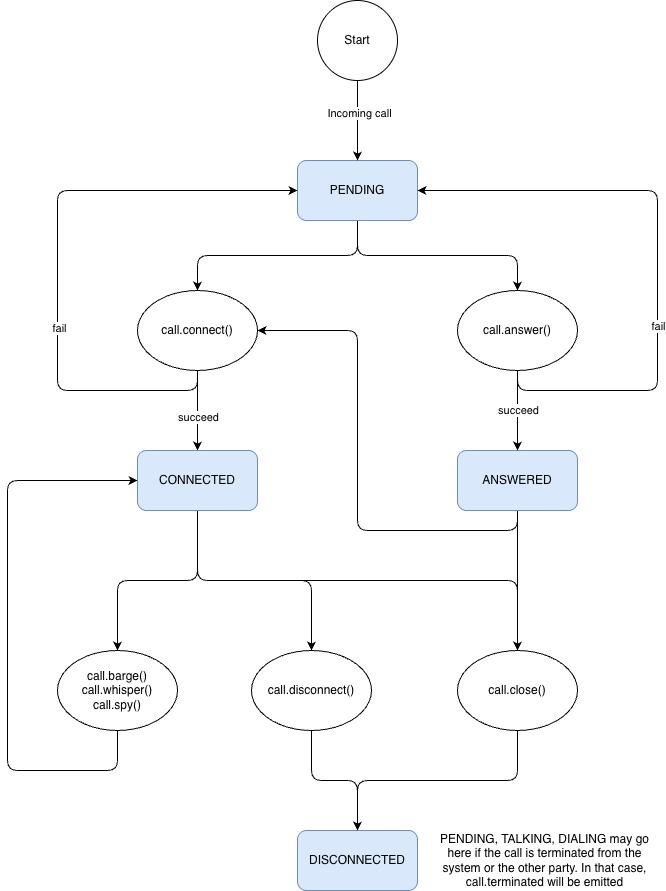
Call States Diagram

States Explained

StateDescriptionAvailable Methods
PENDINGThe call has just arrived. No action has been taken yet. The caller hears ringing.answer(), connect()
ANSWEREDThe call has been answered with answer(). Your server’s WebSocket is actively streaming audio with the caller. You are responsible for feeding audio via send_audio(). If you do not send audio, the caller hears silence.send_audio(), audio_stream(), clear_send_audio_buffer(), connect(), close(), disconnect()
CONNECTEDA connect() call succeeded. The caller, the original callee, and your agent are now in a conference.barge(), whisper(), spy(), send_audio(), close(), disconnect()
DISCONNECTEDThe call has been terminated by close(), disconnect(), server-side termination, or another party hanging up.(none, call is over)

State Transitions

FromEvent / MethodTo
(start)Incoming callPENDING
PENDINGcall.answer() succeedsANSWERED
PENDINGcall.answer() failsPENDING (via call.answer_failed)
PENDINGcall.connect() succeedsCONNECTED
PENDINGcall.connect() failsPENDING (via call.connect_failed)
ANSWEREDcall.connect() succeedsCONNECTED
ANSWEREDcall.close()DISCONNECTED (agent and caller disconnect)
ANSWEREDcall.disconnect()DISCONNECTED
CONNECTEDcall.barge(), call.whisper(), call.spy()CONNECTED
CONNECTEDcall.close()DISCONNECTED from the SDK’s perspective (agent leaves, caller and callee may remain connected)
CONNECTEDcall.disconnect()DISCONNECTED
PENDINGServer terminates call (call.terminated)DISCONNECTED
ANSWEREDServer terminates call (call.terminated)DISCONNECTED
CONNECTEDServer terminates call (call.terminated)DISCONNECTED

Key Behaviors

  • Pre-answer connect: You can call connect() directly from the PENDING state without answering the call first. This lets you route calls to the original callee before your agent picks up the caller.
  • Answered media session: After answer(), the call enters ANSWERED and your application is responsible for the live audio exchange with the caller.
  • Agent stays in call: After a successful connect(), your agent remains in the conference. You can use barge(), whisper(), and spy() to control who hears your agent’s audio.
  • Connect then leave: To replicate a handoff pattern where the agent exits after connecting the other parties, use connect() followed by close().
  • Close behavior depends on state: In ANSWERED, close() ends the call for the agent and caller. In CONNECTED, close() removes the agent while the caller and callee can remain connected.
  • Universal termination: Any active state can transition to DISCONNECTED when the call is terminated server-side. Your application can also end the call explicitly with disconnect().

Next Steps